|
|
简单的窗口管理最大限度地提高您的生产力。
有一大堆的窗户进入你的生产力的方式吗?微风可以帮你安排你的窗户和减轻你的工作流程。
风是什么?
Breeze 1.5.11给你简单的窗口管理对MAC OS X通过“窗口状态”。
当你保存窗口状态,风记得的相对大小和聚焦窗口的位置。
在任何时候,你可以把状态(大小和位置)像模板的任何其他焦点窗口。
有用的默认值:
Breeze 1.5.11带来了一些方便的默认窗口全屏和分屏状态左或右。
让你自己:
拯救你自己的窗口或应用程序窗口状态的美国全球。给他们全球的键盘快捷键,所以你可以移动
在任何应用程序的任何时间窗。
特征:
保存窗口状态(相对大小和在屏幕上的位置)。
-恢复窗口状态,就像一个模板,任何其他窗口。
-多显示器工作和调整不同的分辨率。
-最小界面保持了你的方式和消耗最少的系统资源。
救助流浪的窗户和带他们回到屏幕上。
Breeze gives you simple window management on Mac OS X through a concept called “window states”.
When you save a window state, Breeze remembers the relative size and position of the focused window.
At any point, you can apply that state (size and position) like a template to any other focused window.
Breeze comes with some handy default window states for Fullscreen and Splitscreen Left or Right.
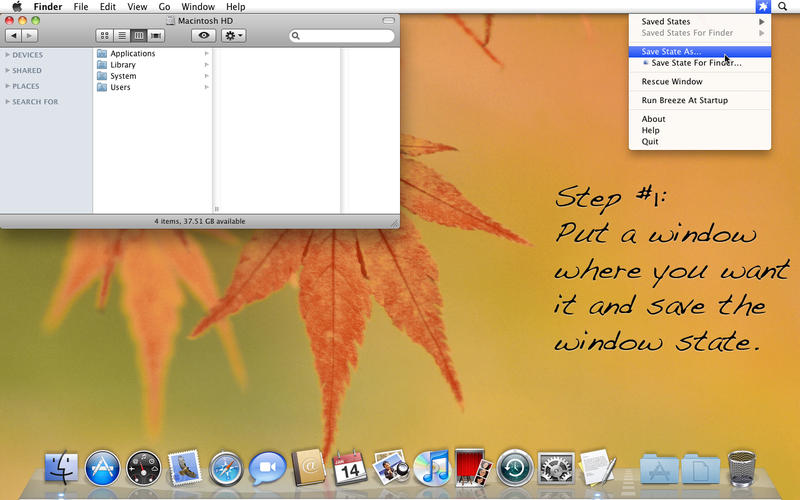
Screenshot 软件截屏:
g1v1xkr2de4.jpeg
System requirements 系统要求:
OS X 10.7 or Later
Links password 下载密码(百度云链接密码):
链接: http://pan.baidu.com/s/1i5x1PBJ 密码: pm5a |
|









 发表于 2016-8-22 03:48:16